
Using the ASC Utility
The Adjacent Structure Coupling (ASC) utility allows you to combine S-parameter solutions into a composite S-parameter solution. You can extract adjacent structure models for applications such as simultaneous switching noise and ground bounce analysis. This utility provides an easy way to create an adjacent structure S-parameter model with accurate power/ground plane resonance and accurate coupling between signal nets and the power/ground nets.
To open the ASC Utility from within SUtility:
- Click Utilities > ASC.
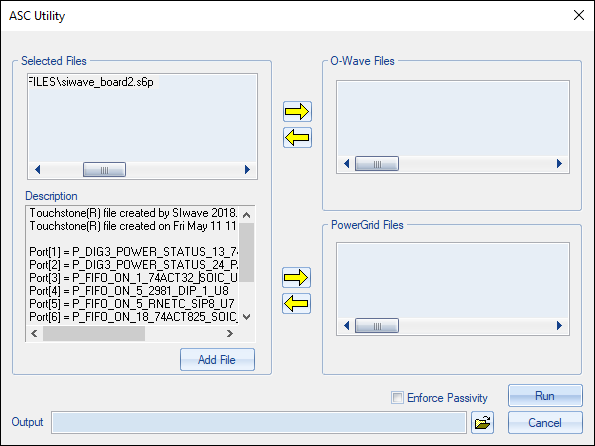
- From the Selected Files area, click Add File to select one or more files. When a file is selected, the Description field updates to display its Touchstone header items.
- Use the arrows to designate/un-designate files as O-Wave or PowerGrid.
- Browse to select an Output file name and destination.
- If appropriate, check Enforce Passivity.
- Click Run to begin the analysis.
The ASC Utility window appears. You can open multiple files at a time. However, the displayed data always corresponds to the dataset indicated in the Projects pane.
The ASC output file is loaded and plotted in the main SUtility window.